Koh Kradan to Koh Lanta by Speedboat: Your Ultimate Guide
- Crossing time 1h 10m–1h 30m
- Operators 3
- Departures a day 2
700+ THB
Schedules & prices


 Pick-Up
 Drop-Off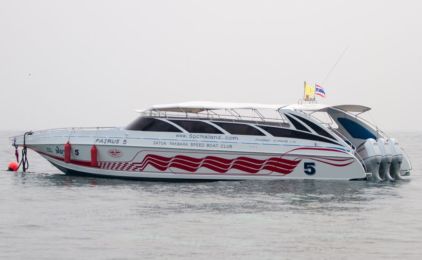
This trip is not available during the selected dates
Koh Kradan to Koh Lanta by Speedboat: Your Ultimate Guide
Planning a trip from Koh Kradan to Koh Lanta by Ferry? Whether you're seeking adventure or a peaceful escape, getting between these two stunning Thai islands is a breeze. With crystal clear water, vibrant coral reefs, and lush landscapes, both islands offer unique experiences for travelers. Here's everything you need to know about the ferry and speedboat options, schedules, prices, and more.
Koh Kradan to Koh Lanta Schedule and Pricing
There are two primary ferry operators for this route: Satun Pakbara Speed Boat Club and Bundhaya Speed Boat. They provide a convenient and fast way to travel between Koh Kradan and Koh Lanta. The journey covers a distance between Koh Kradan and Koh Lanta of approximately 30 miles (49 km) across Andaman Sea.
Schedule
-
First departure: 10:45 AM
-
Last departure: 10:50 AM
The ferry sailings typically depart twice a day, making it easy to fit the journey into your travel plans.
Pricing
-
Cost: THB 950 to THB 1150 ($26 to $32)
Ferry prices typically range depending on the operator and the season. The average price is typically within the mentioned range. Pricing will vary depending on the demand and time of year, so it’s advisable to book your tickets in advance.
You can enjoy two trips a day from Koh Kradan’s Beach Jetty to Koh Lanta’s Saladan Pier. The journey from Kradan to Koh Lanta is scenic and comfortable.
Departure Details
When departing from Koh Kradan, head to the Beach Jetty. This picturesque departure point offers stunning views of the Andaman Sea and the surrounding coral reefs. The journey covers a distance of approximately 30 miles (49 km). It takes between 1 hour and 10 minutes to 1 hour and 15 minutes.
About the Destination
Koh Lanta is a beautiful island known for its pristine beaches, vibrant nightlife, and rich culture. Upon arrival at Saladan Pier, you'll find a variety of transport options to explore the island. It includes taxis, tuk-tuks, and motorbike rentals. Saladan Pier is a bustling hub. You can arrange onward travel to other parts of the island. Or to nearby destinations like Koh Phi Phi and Koh Lipe.
Check-in Instructions
For a smooth trip, make sure to arrive at Koh Kradan’s Beach Jetty at least 30 minutes before departure. This allows ample time for check-in and ensures you can secure a good spot on the speedboat. Have your ticket ready for inspection. Both Bundhaya Speed Boat and Satun Pakbara Speed Boat Club Tigerline ferry offer comfortable seating and onboard amenities to make your journey pleasant.
Important Travel Information
-
Luggage: Ensure your luggage is properly labeled and securely fastened. There's typically no strict limit, but it’s wise to travel light, especially if you’re a foot passenger from Koh Kradan.
-
Safety: Life jackets are provided on all boats. Follow the crew's safety instructions at all times to ensure a safe journey across the Andaman Sea.
-
Weather: Keep in mind that sea conditions can vary. Check the weather forecast and confirm your booking if you’re traveling during the monsoon season.
The route from Kradan Beach to Saladan Pier offers stunning vistas of the Andaman Sea, with its crystal clear waters and vibrant marine life.
Conclusion
Traveling from Koh Kradan to Koh Lanta is enjoyable with the available speedboat services. With just over an hour of travel time, you'll be exploring the beautiful Koh Lanta in no time. Enjoy the serene waters, the lush scenery, and the excitement of discovering new places. Book your tickets today and embark on a seamless journey across the Andaman Sea!
Frequently asked questions
Do I need to print my ferry ticket or is mobile ok?
You don't need to print your ticket. Your boarding voucher is in your account: open Bookings, then View trip details, and click Download PDF. On the day of travel, show the QR code on it — on your phone is fine — to the ferry operator staff at the pier named on your ticket, and they will direct you to your boat.
If you'd prefer paper, print the PDF yourself.
What happens if my ferry is cancelled due to weather?
We are sorry when weather stops a sailing. Ferries usually run in rain; speedboats are more often stopped by rough seas.
If your trip is cancelled because of weather, your booking in Bookings shows a message once our team has confirmed the cancellation. You can then either move to the next available service with Change this booking, or cancel with Cancel & refund for a full refund.
If the sailing is running but you choose not to travel, the normal cancellation policy applies.
Why is my account locked?
We lock an account for a short time after several failed sign-in attempts in a row. It is an automatic safety measure: it stops someone else guessing your password, and it happens whether or not the person typing was you.
You do not need to contact us. The lock lifts on its own — see How long am I locked out for?
What is the difference between a locked and a blocked account?
Locked is automatic and temporary. It happens after repeated failed sign-in attempts and it lifts by itself — within a minute in most cases.
Blocked is a decision made by our team, and it does not lift on its own. If your account is blocked you will need to contact us; waiting will not change it, and neither will resetting your password.
If you are not sure which applies to you, get in touch and we will tell you.
How do I unlock my account now?
Wait, and try again. Every lock lifts on its own — a minute the first time, and never more than an hour however many attempts have failed. There is nothing to click and nobody to contact.
If you have forgotten your password, do not keep guessing: each wrong attempt makes the next wait longer. Use Forgot password instead. Resetting your password gets you straight back in.
My account locked but I never tried to sign in
Then someone else was trying to sign in as you, and the lock did its job — it stopped them.
Your account is safe: a lock means the attempts failed. Nobody got in. You do not have to do anything, and the lock will lift on its own.
We would still recommend two things:
- Change your password, especially if you use the same one on another website.
- Add an authenticator app in your account security settings, so a password alone is never enough to sign in as you.
If you get these repeatedly, contact us and we will look into it.