Koh Mook to Koh Phi Phi Ferry: Fares & Sailings
- Crossing time 2h–2h 30m
- Operators 2
- Departures a day 2
1,600+ THB
Schedules & prices


 Pick-Up
 Drop-Off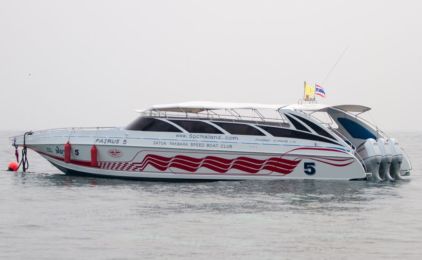
This trip is not available during the selected dates
How to get from Koh Mook to Koh Phi Phi

Journey from Koh Mook to Koh Phi Phi: A Tropical Escape
Embarking on a journey from the serene Koh Mook to the vibrant Koh Phi Phi offers travelers a glimpse into the diverse beauty of Thailand's islands. Koh Mook, known for its crystal-clear waters and the famous Emerald Cave, serves as a tranquil starting point. In contrast, Koh Phi Phi entices with its bustling beaches, stunning viewpoints, and vibrant nightlife. Transitioning between these islands by Koh Mook to Koh Phi Phi ferry or speedboat is not just a travel necessity but an opportunity to experience the varying facets of Thai island life.
Koh Mook and Koh Phi Phi Schedule and Price
Navigating the waters between Koh Mook and Koh Phi Phi is made convenient with reliable ferry and speedboat services. These options cater to diverse preferences, from leisurely ferry rides to swift speedboat crossings, ensuring a memorable part of your island-hopping adventure.
Departure Details:
Koh Mook to Koh Phi Phi Speedboat Services: For those seeking a quicker passage, speedboat services are available, cutting travel time to approximately 2 hours and 30 minutes. Operators like Satun Pakbara Speed Boat Club and Bundhaya Speed Boat offer schedules in the morning around 11:00 AM.
Pricing Information:
Speedboat Ticket: For faster transit, Koh Mook to Koh Phi Phi speedboat tickets start at 1,600 THB providing a speedy and convenient option.
Check-in Instructions:
Travelers are advised to check in at least 30 minutes before departure at the designated pier on Koh Muk. Essential travel documents, including tickets and identification, should be ready for inspection. You can check in with e-ticket on mobile or device. Please make sure you check in with the right operator you booked with.
Important Travel Information
- Luggage Allowance: Both ferry and speedboat operators typically allow a standard luggage size of up to 20kg per passenger. Excess luggage may incur additional charges.
- Travel Duration: Between 2-3 hours.
- Onboard Amenities: Amenities differ by operator but generally include seating areas, restrooms, and sometimes, refreshments for purchase.
- Health and Safety Guidelines: Operators encourage travelers to adhere to all advised health and safety protocols, including wearing life jackets on speedboat journeys.
- Peak Travel Time: The dry season, especially from December to February, is considered the best time to visit. With minimal rainfall, clear skies, and cooler temperatures, it’s perfect for beach activities, snorkeling, and exploring the islands.
- Considerations: Being the peak season, expect higher prices and more crowded attractions. Booking your Koh Mook to Koh Phi Phi ferry or speedboat in advance is crucial to secure your spot.
- Quieter Travel Time: The monsoon season brings heavier rainfall and rougher seas, particularly from July to September. However, the rain is often short-lived, clearing up quickly and still allowing for enjoyable travel experiences.
- Considerations: Ferry and speedboat schedules may be more subject to change due to weather conditions. It's important to check weather forecasts and stay flexible with your travel plans.
- Respect Local Guidelines: Both Koh Mook and Koh Phi Phi have guidelines to protect their natural beauty. Follow all local regulations regarding litter, coral protection, and wildlife interactions.
Frequently asked questions
Do I need to print my ferry ticket or is mobile ok?
You don't need to print your ticket. Your boarding voucher is in your account: open Bookings, then View trip details, and click Download PDF. On the day of travel, show the QR code on it — on your phone is fine — to the ferry operator staff at the pier named on your ticket, and they will direct you to your boat.
If you'd prefer paper, print the PDF yourself.
What happens if my ferry is cancelled due to weather?
We are sorry when weather stops a sailing. Ferries usually run in rain; speedboats are more often stopped by rough seas.
If your trip is cancelled because of weather, your booking in Bookings shows a message once our team has confirmed the cancellation. You can then either move to the next available service with Change this booking, or cancel with Cancel & refund for a full refund.
If the sailing is running but you choose not to travel, the normal cancellation policy applies.
Why is my account locked?
We lock an account for a short time after several failed sign-in attempts in a row. It is an automatic safety measure: it stops someone else guessing your password, and it happens whether or not the person typing was you.
You do not need to contact us. The lock lifts on its own — see How long am I locked out for?
What is the difference between a locked and a blocked account?
Locked is automatic and temporary. It happens after repeated failed sign-in attempts and it lifts by itself — within a minute in most cases.
Blocked is a decision made by our team, and it does not lift on its own. If your account is blocked you will need to contact us; waiting will not change it, and neither will resetting your password.
If you are not sure which applies to you, get in touch and we will tell you.
How do I unlock my account now?
Wait, and try again. Every lock lifts on its own — a minute the first time, and never more than an hour however many attempts have failed. There is nothing to click and nobody to contact.
If you have forgotten your password, do not keep guessing: each wrong attempt makes the next wait longer. Use Forgot password instead. Resetting your password gets you straight back in.
My account locked but I never tried to sign in
Then someone else was trying to sign in as you, and the lock did its job — it stopped them.
Your account is safe: a lock means the attempts failed. Nobody got in. You do not have to do anything, and the lock will lift on its own.
We would still recommend two things:
- Change your password, especially if you use the same one on another website.
- Add an authenticator app in your account security settings, so a password alone is never enough to sign in as you.
If you get these repeatedly, contact us and we will look into it.