Koh Lanta to Phuket Ferry & Speedboat Transfers
- Crossing time 1h 30m–6h 30m
- Operators 7
- Departures a day 6
750+ THB
Schedules & prices


 Pick-Up
 Drop-Off





This trip is not available during the selected dates
Coastal Odyssey: Navigating from Koh Lanta to Phuket

Phuket is one of the most popular destinations in Thailand. People call it “The Pearl Of The Andaman Sea”. It’s Thailand’s biggest island. It’s filled with so many options and a variety of activities that suit every budget and every taste.
Enjoy the fresh seafood, the forested landscape around the beaches. Or enjoy diving, hiking, and a relaxing Thai massage. Or you can enjoy a day trip to the nearby islands, Koh Phi Phi, Similan or the sea caves of Phang Nga Bay. Or you can opt for Koh Samui, Koh Lipe, Koh Kradan, Koh Lanta, Railay. Check here our Phuket to Phi Phi Tonsai Pier offers. For your information, the distance between Koh Lanta and Phi Phi Island is about 35 kilometers (22 miles.) Bundhaya Speed Boat covers it in 60 minutes.
You can rent a motorcycle for the day or for short distances. Look for the “motorcycle taxi”. Drivers wear red or green vests. They will take you anywhere you want.
When journeying from Koh Lanta to Phuket, you'll find that Krabi Airport serves as a pivotal transportation hub. Situated between Koh Lanta and Phuket, it offers travelers efficient connectivity. Additionally, Krabi Town and Ao Nang, which are both accessible from the airport, serve as excellent stopovers.
From Koh Lanta to Phuket by taxi/minivan
You can book a private taxi/minivan or shared minivan to take you to/from Sea Angel Pier, Phuket international airport, Rassada Pier, Phuket Marina, Patong, Phuket town and many others.
The private minivan carries up to eight people. And the private taxi carries up to three people.
From Koh Lanta to Phuket by ferry
The island has three piers: Sea Angel Pier, Numchai Pier, and the main Pier Rassada Pier, but from Koh Lanta, the ferries only sail to Rassada Pier and Numchai Pier.
For those planning their journey, ferry services are readily available to transport you to your desired destinations. Be sure to check the ferry times, as they vary throughout the day. Multiple ferry operators operate these routes, and you can conveniently purchase your ferry tickets to secure your passage.
When you travel from Koh Lanta to Phuket, you have to change boats in Koh Phi Phi first.
From Saladan Pier to Rassada Pier
Saladan Pier is the only ferry pier in Koh Lanta. The ferry will depart from the pier to reach Koh Phi Phi. After changing of boat, the trip will continue straight to Phuket and reach Rassada Pier.
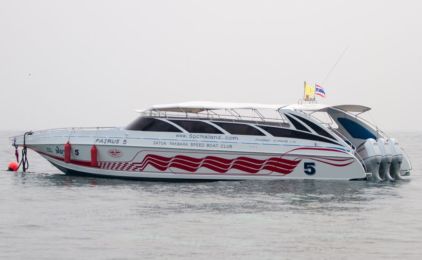
If you’re in a hurry or need a more luxurious trip, you can buy tickets for the speedboat from Saladan Pier to Rassada Pier. The operator is Satun Pakbara Speed Boat Club.
The speedboat trip is not suitable for children under 3 years old, pregnant women, people with back or heart problems or any other physical impediments.
From Saladan Pier to Numchai Pier
The ferry will depart from Saladan Pier to stop at Tonsai Pier in Koh Phi Phi and then change boats to go straight to Phuket.
Best time to visit
30°c is the temperature in Phuket all year round. But the ideal time to visit Phuket is between November and March when the rains stop, the weather is dry, and the sea settles. The weather remains hot and humid outside these months. The weather becomes more challenging from July to October, as the sea becomes dangerous and the warning red flags are all over the beaches. At this time the sea is favorable for surfers due to the high waves especially on the west coast but not so much fun for those hoping to chill and lounge.
Check what our customers are saying about their experience. Don’t hesitate to write here about your own experience with us!
We are always here for our customers! If you have any questions, please go to to our help page and Leave us a message.
Frequently asked questions
Do I need to print my ferry ticket or is mobile ok?
You don't need to print your ticket. Your boarding voucher is in your account: open Bookings, then View trip details, and click Download PDF. On the day of travel, show the QR code on it — on your phone is fine — to the ferry operator staff at the pier named on your ticket, and they will direct you to your boat.
If you'd prefer paper, print the PDF yourself.
What happens if my ferry is cancelled due to weather?
We are sorry when weather stops a sailing. Ferries usually run in rain; speedboats are more often stopped by rough seas.
If your trip is cancelled because of weather, your booking in Bookings shows a message once our team has confirmed the cancellation. You can then either move to the next available service with Change this booking, or cancel with Cancel & refund for a full refund.
If the sailing is running but you choose not to travel, the normal cancellation policy applies.
Why is my account locked?
We lock an account for a short time after several failed sign-in attempts in a row. It is an automatic safety measure: it stops someone else guessing your password, and it happens whether or not the person typing was you.
You do not need to contact us. The lock lifts on its own — see How long am I locked out for?
What is the difference between a locked and a blocked account?
Locked is automatic and temporary. It happens after repeated failed sign-in attempts and it lifts by itself — within a minute in most cases.
Blocked is a decision made by our team, and it does not lift on its own. If your account is blocked you will need to contact us; waiting will not change it, and neither will resetting your password.
If you are not sure which applies to you, get in touch and we will tell you.
How do I unlock my account now?
Wait, and try again. Every lock lifts on its own — a minute the first time, and never more than an hour however many attempts have failed. There is nothing to click and nobody to contact.
If you have forgotten your password, do not keep guessing: each wrong attempt makes the next wait longer. Use Forgot password instead. Resetting your password gets you straight back in.
My account locked but I never tried to sign in
Then someone else was trying to sign in as you, and the lock did its job — it stopped them.
Your account is safe: a lock means the attempts failed. Nobody got in. You do not have to do anything, and the lock will lift on its own.
We would still recommend two things:
- Change your password, especially if you use the same one on another website.
- Add an authenticator app in your account security settings, so a password alone is never enough to sign in as you.
If you get these repeatedly, contact us and we will look into it.